

Connect Cloudflare R2
Before you start
Section titled “Before you start”- A Cloudflare account with R2 enabled.
- A bucket. R2 bucket names are 3–63 characters: lowercase letters, numbers and hyphens, not starting or ending with a hyphen.
- A custom domain connected to the bucket (R2 › the bucket › Settings › Custom Domains). An
r2.devaddress works, but Cloudflare rate-limits it, throttles its bandwidth and doesn’t cache it, so the plugin warns you.
1. Create an API token
Section titled “1. Create an API token”In the Cloudflare dashboard, create an Account API token, not a User token: a User token stops working when that person leaves the account. Give it Object Read & Write on this one bucket only.
2. Keep the secret out of the database
Section titled “2. Keep the secret out of the database”Add the keys to wp-config.php. Constants win over anything stored, and the fields become read-only.
define( 'ZDOM_ACCESS_KEY_ID', '…' );define( 'ZDOM_SECRET_ACCESS_KEY', '…' );3. Fill in Settings › Safe Media Offload
Section titled “3. Fill in Settings › Safe Media Offload”| Field | What to enter |
|---|---|
| Provider | Cloudflare R2. |
| Account ID | Your Cloudflare account ID. It builds the endpoint <account>.r2.cloudflarestorage.com. |
| Jurisdiction | Default, European Union or FedRAMP. It must match the bucket, and can’t change after the bucket is created. |
| Bucket | The bucket’s name. |
| Delivery domain | The custom domain connected to the bucket. |
| Key prefix | Optional. A folder inside the bucket, useful when several sites share one. |
| Private bucket | Optional. A second bucket with public access off, for WooCommerce downloads. See Paid downloads. |
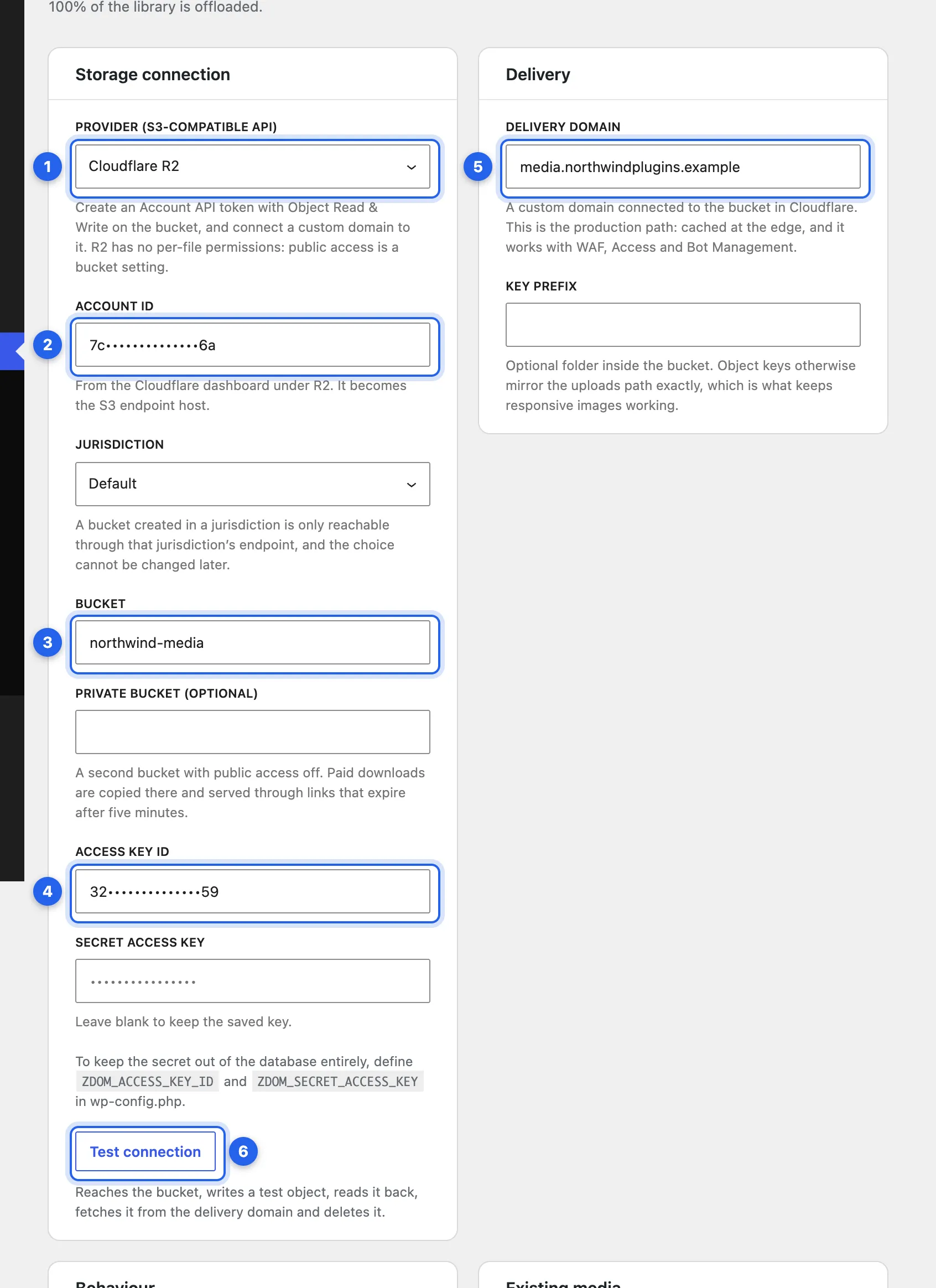
1 Provider: Cloudflare R2. 2 Account ID. 3 Bucket. 4 The access key, unless it’s in wp-config.php. 5 Delivery domain. 6 Test connection, the next step. Keys and IDs are masked in this screenshot.
4. Test the connection
Section titled “4. Test the connection”Save, then click Test connection. It runs these checks in order and reports each on its own, so you can see exactly where a problem is:
- Reach the bucket.
- Write a test file.
- Read it back.
- Fetch it through your delivery domain, as a visitor would.
- Delete it.
With a private bucket, it also writes there, fetches the file through an expiring link and deletes it, and checks that your delivery domain doesn’t serve the private bucket. On R2 it can’t check that the private bucket is closed to everyone else, so keep public access and custom domains off for it in Cloudflare.
If you change the provider, account, jurisdiction, bucket, private bucket or keys later, the plugin waits for a new test before it offloads anything else. A new delivery domain or key prefix doesn’t need one.
5. Start serving from R2
Section titled “5. Start serving from R2”New uploads go to the bucket as soon as the test passes. Turn on Serve media from the provider to serve them from R2. To move the rest of the library, start Offload existing media.
Next: Offload existing media.
Checked against ZealDen Safe Media Offload 1.0.3 on main, 19 October 2026.