

Set up Sell Your Plugins
-
Upload the plugin and activate it. WooCommerce must be active.
-
Follow the setup wizard. Its first step shows a line to add to
wp-config.php, with a freshly generated key:define( 'ELM_ENCRYPTION_KEY', 'a-long-random-string' );Add it above “That’s all, stop editing!”. Keys can’t be issued without it, and stored keys can’t be read without it, so back it up with your database and never change it.
-
On a product, tick Licensed and fill in the Licensing tab. See Licensed products.
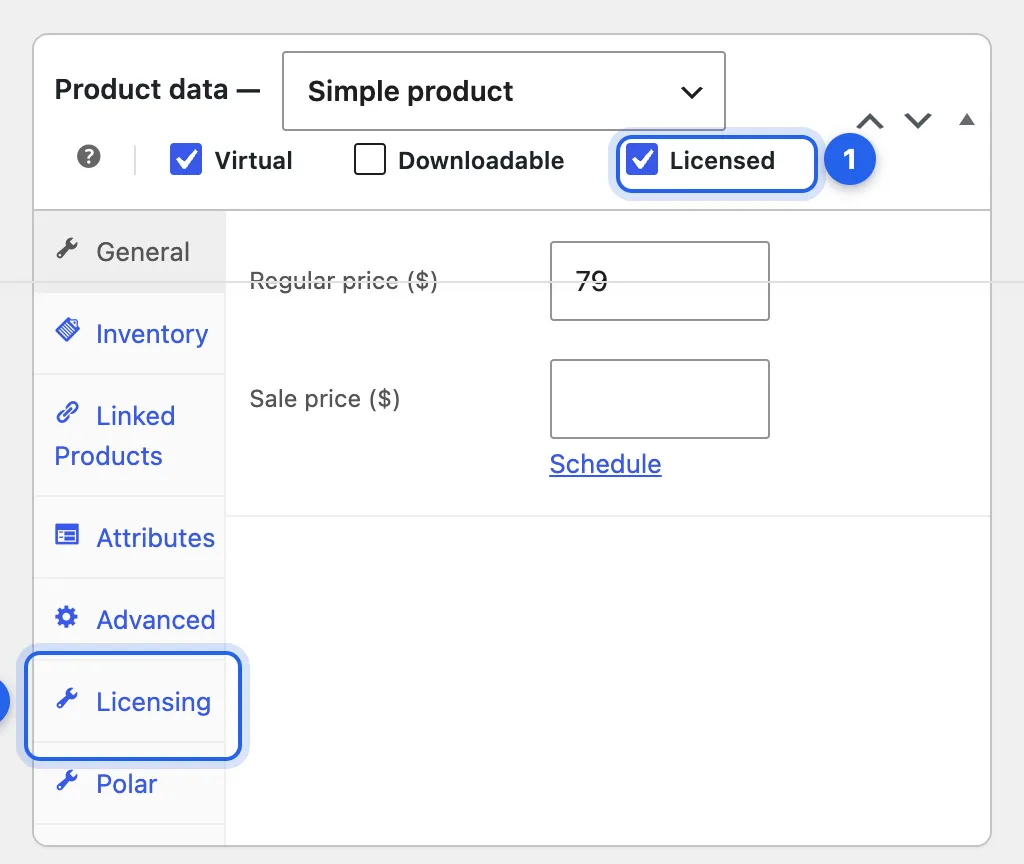
1 Licensed. 2 The Licensing tab.
Protect your zip files
Section titled “Protect your zip files”WooCommerce keeps downloadable files in wp-content/uploads/woocommerce_uploads/ and protects them with an .htaccess rule that many servers ignore. Sell Your Plugins makes sure product zips can only be fetched through signed links.
- Apache and LiteSpeed: Sell Your Plugins adds a short marked block to your site’s
.htaccessfile and to the downloads folder’s own. It does this on activation, after an update, and from Fix it in Tools › Site Health. On OpenLiteSpeed, restart the web server afterwards: it reads these rules only when it starts. To stop it writing them, useadd_filter( 'elm_write_htaccess_rule', '__return_false' );. - nginx: add this to your server block and reload nginx. WooCommerce’s X-Accel-Redirect download method keeps working with it.
location ^~ /wp-content/uploads/woocommerce_uploads/ { internal;}Use WooCommerce’s Force downloads or X-Accel-Redirect/X-Sendfile download method, not Redirect only.
Local and test sites
Section titled “Local and test sites”Under WooCommerce › Licenses, choose Settings. Local and test sites is on by default: localhost, private and loopback IP addresses, and .test, .local, .localhost, .example and .invalid addresses don’t count against a license’s site limit. The elm_site_is_free filter changes which sites are free.
Health and logs
Section titled “Health and logs”- Tools › Site Health warns when the encryption key is missing, when a product’s imported keys have run out, when update zips can be downloaded by their address, and when WooCommerce’s download method is Redirect only. Its Info tab has a Sell Your Plugins section for support requests.
- Sell Your Plugins logs to WooCommerce › Status › Logs, source
zealden-license-manager.
Enter your license key
Section titled “Enter your license key”For updates to Sell Your Plugins itself: WooCommerce › Licenses › Settings, in the License card at the bottom. See Activate a key.
Checked against ZealDen Sell Your Plugins 1.1.4 on main, 19 October 2026.