
Merchant of record, explained: what it takes off you, and which ones work with WooCommerce
We make Payments via Polar (Merchant-of-record payment gateway for WooCommerce), which this article mentions where it does a step for you. Every figure here is linked to its source and dated, and we've said where other tools are a better fit.
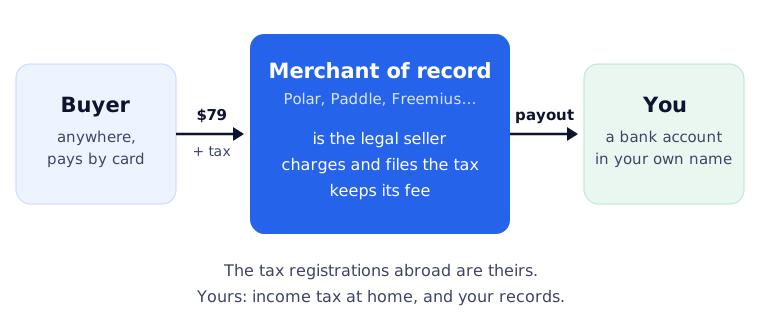
A merchant of record is the company that legally sells your product to the buyer. Its name is on the receipt and on the card statement. It works out the right VAT, GST or sales tax for wherever the buyer is, collects it, files it, and pays it to each country. It takes the payment, deals with fraud and chargebacks, and pays you what’s left after its fee.
That’s the whole idea: you sell to one company, and it sells to the world. What it doesn’t take off you matters just as much, so that comes first.
What it takes off you, and what stays yours
| The job | Selling yourself, with a payment processor | Selling through a merchant of record |
|---|---|---|
| Being the seller on the receipt | You | The merchant of record |
| Registering for VAT, GST or sales tax in other countries | You, wherever you cross a threshold | The merchant of record |
| Charging, filing and paying that tax | You | The merchant of record |
| Invoices and receipts to buyers | You | The merchant of record |
| Card payments and fraud screening | Your processor | The merchant of record |
| Chargebacks | You answer them | The merchant of record answers them, and may charge you for each one |
| Refunds | You decide | You decide, but it can refund without asking you, within limits |
| Income tax on what you earn | You | Still you |
| Support for your product | You | Still you |
| Your customer list | Yours | Yours only if your own store holds it |
Two rows on that table surprise people. Refunds: Polar may refund an order on its own up to 60 days after purchase, to head off a chargeback, and doesn’t return its fee when anything is refunded (Polar fees). Stripe’s merchant of record says that if a buyer asks it for a refund and you don’t reply within 48 hours, it might refund without your approval (Stripe). Chargebacks: Polar charges $15 for each dispute, whatever the outcome.
If you’re deciding whether you can use one at all from where you live, the country checks and payout schedules are in Stripe isn’t available in your country? How to sell software to the world anyway.
What they really cost on a month of sales
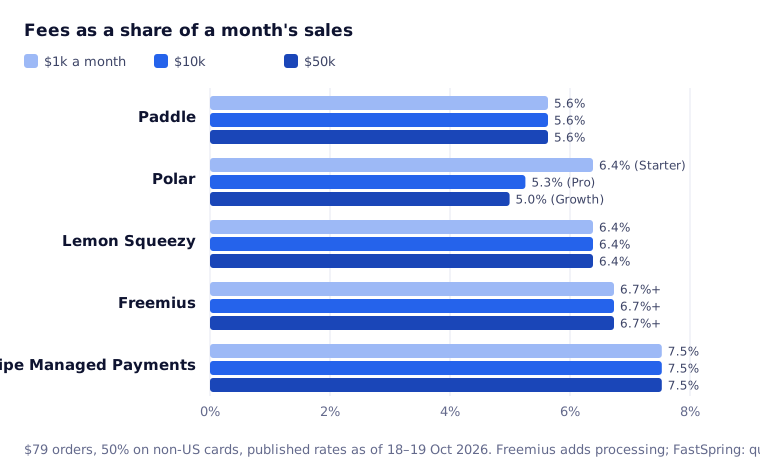
Fees are quoted per sale, but the real comparison is a month. Here’s what each keeps from a month of $79 sales, with half the cards from outside the US, at the rates published on 18–19 October 2026:
| A month of sales | $1,000 | $10,000 | $50,000 |
|---|---|---|---|
| Paddle | $56, 5.6% | $563, 5.6% | $2,816, 5.6% |
| Polar | $64, 6.4% (Starter) | $526, 5.3% (Pro) | $2,497, 5.0% (Growth) |
| Lemon Squeezy | $64, 6.4% | $638, 6.4% | $3,191, 6.4% |
| Freemius | $67, 6.7% + processing | $673, 6.7% + processing | $3,366, 6.7% + processing |
| Stripe Managed Payments | $75, 7.5% | $753, 7.5% | $3,765, 7.5% |
| FastSpring | Quote only | Quote only | Quote only |
Where the numbers come from:
- Paddle: 5% + 50¢ a sale (Paddle pricing).
- Polar: 5% + 50¢ on the free Starter plan; Pro is 3.8% + 40¢ for $20 a month, Growth 3.6% + 35¢ for $100, Scale 3.4% + 30¢ for $400; plus 1.5% on non-US cards. The table uses whichever plan is cheapest at each level (Polar fees).
- Lemon Squeezy: 5% + 50¢, plus 1.5% on international payments (Lemon Squeezy fees).
- Freemius: 6.1% + 50¢ on its WordPress plan, plus payment processing it doesn’t price in advance (Freemius pricing).
- Stripe Managed Payments: 3.5% “in addition to the standard Stripe payment processing fees” (Stripe), which are 2.9% + 30¢ and 1.5% more for international cards (Stripe pricing). Its 3.5% is charged on the total including tax, so on a European sale with 20% VAT it works out at 4.2% of your price.
- FastSpring doesn’t publish rates.
What the table leaves out: getting the money home (Polar passes on Stripe’s payout charge of $2 a month plus 0.25% + 25¢ a payout; Lemon Squeezy charges 1% to pay a non-US bank), subscription extras (Lemon Squeezy adds 0.5%; Stripe Billing adds 0.7%), and anything you negotiate. Polar offers custom rates if you ask.
Which ones work with WooCommerce
This is the question no comparison page answers, and it decides the shortlist if you already sell from WooCommerce. A merchant of record needs a payment gateway, a plugin that puts it at your checkout and keeps the WooCommerce order in step with the payment. Here’s what exists on 19 October 2026:
| WooCommerce gateway | Where the buyer pays | Subscriptions | |
|---|---|---|---|
| Polar | Payments via Polar (ours, paid). None on WordPress.org | A Polar window over your checkout page, or Polar’s own page | Polar bills; each renewal becomes a WooCommerce order. Works with WooCommerce Subscriptions |
| Paddle | Third-party: Checkout Gateway for Paddle (80 installs), SaleMint (30 installs) | Paddle’s checkout, hosted or embedded | Depends on the plugin |
| Lemon Squeezy | Third-party: Devtonic (10 installs). Lemon Squeezy’s own WordPress plugin sells through its checkout instead of WooCommerce | Lemon Squeezy’s checkout | Depends on the plugin |
| FastSpring | Third-party: VMS Elements (10 installs) | FastSpring’s checkout | Depends on the plugin |
| Freemius | None: it’s a platform of its own for WordPress plugins and themes, with its own checkout, licensing and updates | Freemius’ checkout | Freemius |
| Stripe Managed Payments | None, and WooCommerce’s Stripe extension can’t use it (below) | Stripe Checkout only | Stripe |
Install counts are WordPress.org’s own, rounded as it shows them. A gateway with a handful of installs isn’t necessarily bad, but you’re relying on one developer to keep up with both WooCommerce and the provider’s API.
Stripe Managed Payments isn’t a WooCommerce option
Stripe’s own merchant of record launched this year, and Lemon Squeezy is moving onto it. Three things in Stripe’s documentation rule it out for most WooCommerce stores today:
- It works only with Stripe Checkout or Payment Links (Stripe). WooCommerce’s official Stripe extension takes the payment on your own checkout page with Stripe Elements, so it can’t switch Managed Payments on.
- The buyer sees Link as the seller. Purchases show as “Sold through Link”, the statement reads
LINK.COM*followed by your descriptor, and receipts come from Link. Custom domains aren’t supported on its checkout. - Only some countries can sign up: the US, Canada, the EEA, the UK, Switzerland, Norway, Liechtenstein, Australia, Hong Kong, Japan and Singapore.
If you sell from a Stripe Checkout page already and live in one of those countries, it’s worth a look. If your shop is WooCommerce, it isn’t yet.
How to choose
- You sell from WooCommerce and want to keep your store: you need a gateway. Polar has the only one built for it that we know of (ours); Paddle has two small third-party ones.
- You sell a WordPress plugin and would rather not run a store at all: Freemius gives you checkout, licensing and updates in one, for 6.1% + 50¢ plus processing.
- You sell from Stripe Checkout and live where it’s offered: Stripe Managed Payments keeps everything inside Stripe, at the highest rate here.
- Volume matters most: from about $3,500 a month, Polar’s $20 Pro plan comes out cheaper than Paddle’s flat 5% + 50¢ in this model, and the gap widens from there. Below it, Paddle is cheapest.
- You’re on Lemon Squeezy: it’s moving to Stripe Managed Payments, so check whether you’ll still qualify before building more on it.
How we do it
We sell our own WordPress plugins from a WooCommerce store, with Polar as the merchant of record. Shoppers check out on our site, Polar’s window takes the payment and adds the right tax, and the WooCommerce order completes when Polar confirms it. Our store keeps the customer account, the license keys and the plugin updates.
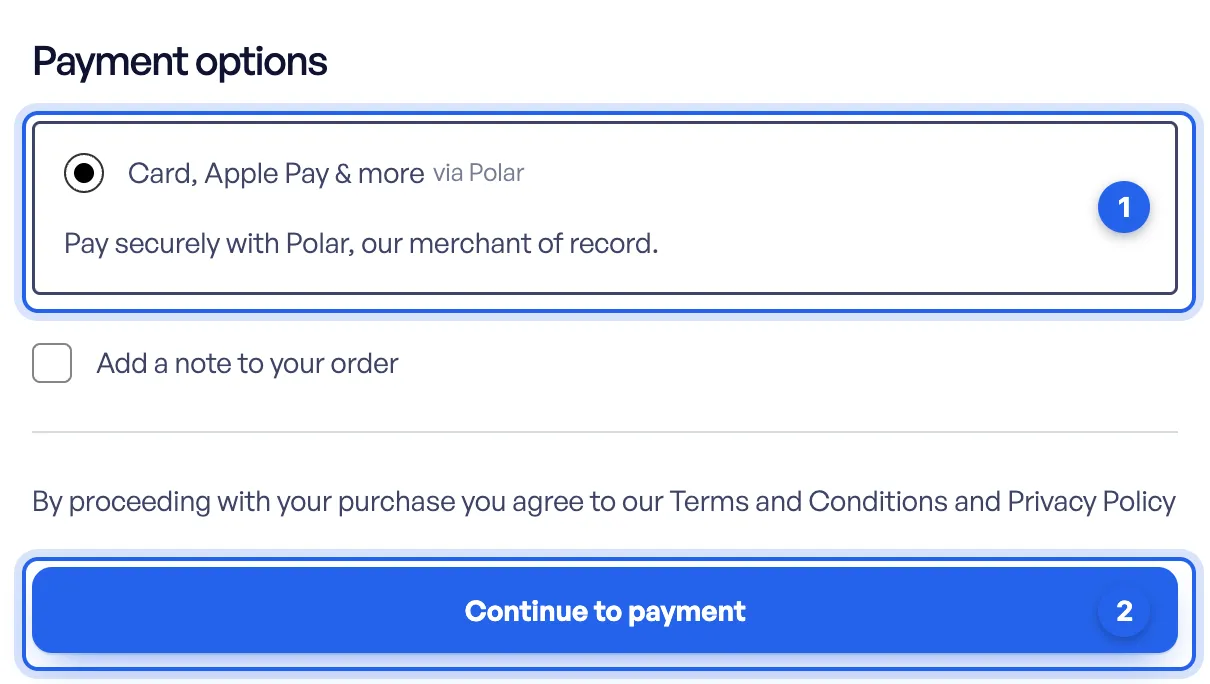
That’s our plugin, Payments via Polar, and setting it up takes an access token and a webhook: see the setup guide. Whichever merchant of record you pick, the questions are the same: who’s the seller on the receipt, what you still owe at home, and whether there’s a gateway you trust for your store.