
What Cloudflare R2 really costs for a WordPress site
We make Safe Media Offload (WordPress media offload to Cloudflare R2, Amazon S3 and more), which this article mentions where it does a step for you. Every figure here is linked to its source and dated, and we've said where other tools are a better fit.
For most WordPress sites, Cloudflare R2 costs nothing to a few dollars a month. The free tier covers 10 GB of storage and 10 million reads a month, and R2 never charges for data sent to visitors. You start paying at $0.015 per GB-month beyond 10 GB, which is $15 per terabyte.
That headline hides two things that decide your real bill: WordPress stores far more than you upload, and R2 is only cheap to serve from if you put your own domain in front of it. Here’s the whole picture, with three store sizes worked out and a calculator for your own numbers.
R2’s price list, plainly
From Cloudflare’s R2 pricing page (updated 1 October 2026):
| Standard | Infrequent Access | |
|---|---|---|
| Storage | $0.015 per GB-month | $0.01 per GB-month |
| Writes (Class A: upload, copy, list) | $4.50 per million | $9.00 per million |
| Reads (Class B: download, check a file) | $0.36 per million | $0.90 per million |
| Data sent to visitors | Free | Free, plus $0.01 per GB retrieved |
| Free every month | 10 GB, 1 million writes, 10 million reads | Nothing: the free tier doesn’t apply |
| Minimum storage time | None | 30 days |
Deleting files is free, and requests refused as unauthorised aren’t billed. Usage rounds up: 1.1 GB-month is billed as 2, and 1,000,001 operations as 2 million.
Keep a WordPress library on Standard. Infrequent Access gets no free tier, charges for every read, and bills 30 days for anything you delete sooner. That suits backups, not product photos that visitors load every day.
One upload is eleven files
Your media library is bigger than the photos you uploaded. We uploaded one 3000 × 2000 product photo to WordPress 7.1 with WooCommerce and counted what landed on disk:
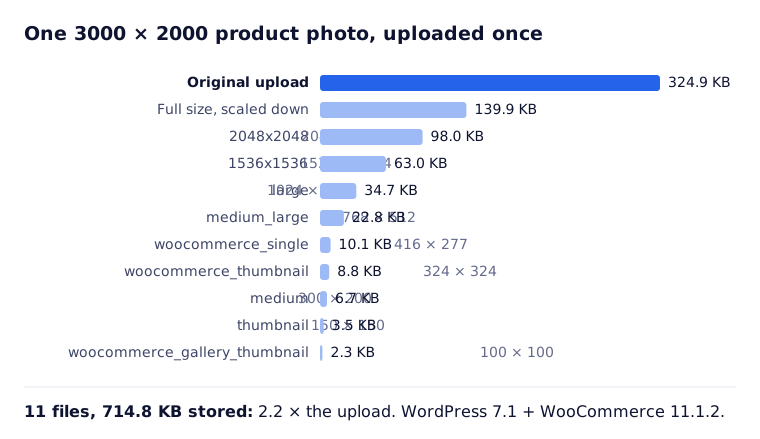
- WordPress keeps your original and makes a scaled copy. Any image wider or taller than 2,560 px is scaled down for use on the site, and the original stays on disk too.
- Six WordPress sizes and three WooCommerce sizes follow: from the 2048 px copy down to the 100 px gallery thumbnail. Your theme and plugins can add more.
- Each file is a separate object in a bucket: one write to store it, one read each time a cache asks for it.
So a store with 7,000 product images holds about 77,000 files, and every gigabyte you uploaded takes about 2.2 GB to store. To see your own figure, open Tools › Site Health › Info › Directories and Sizes and look at the uploads directory size.
How a request reaches R2
R2 has no charge for data sent out, but it does charge for reads. What keeps those reads inside the free 10 million is Cloudflare’s cache in front of the bucket:
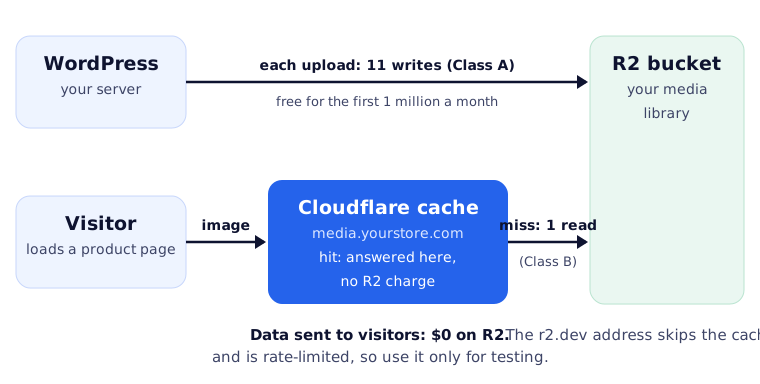
- Connect a custom domain such as
media.yourstore.com. The domain has to be a zone in the same Cloudflare account as the bucket. Then Cloudflare caches images, which it does by default for JPG, PNG, WebP, AVIF and SVG. - A request the cache answers never reaches the bucket, so it isn’t an R2 operation. Only misses are reads.
- Don’t serve a live site from the
r2.devaddress. Cloudflare’s docs say it is “rate-limited and should only be used for development purposes”, and it gets none of the cache.
Three stores, worked out
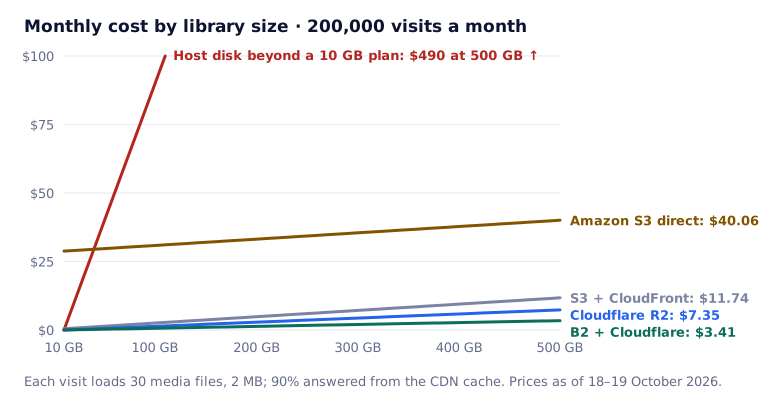
What a month costs on each option, at Cloudflare, AWS and Backblaze list prices as of 18–19 October 2026. Each visit loads 30 media files and 2 MB, and the CDN answers 90% from its cache. “Host disk” means paying for disk beyond a hosting plan that includes 10 GB:
| A month on | Small store: 5 GB, 20,000 visits | Growing store: 50 GB, 200,000 visits | Large catalogue: 300 GB, 1 million visits |
|---|---|---|---|
| Host disk beyond a 10 GB plan | $0 | $40.00 | $290 |
| Amazon S3, served directly | $0.35 | $29.71 | $186 |
| Amazon S3 + CloudFront | $0.14 | $1.39 | $107 |
| Backblaze B2 + Cloudflare | $0 | $0.28 | $2.02 |
| Cloudflare R2 | $0 | $0.60 | $4.35 |
What the table says:
- Small store: nothing to gain on cost. It fits in the disk your host already gives you, and every option is close to free. Move for other reasons (speed, backups, a staging site that shares the library) or not at all.
- Growing store: this is where the disk warning arrives. Kinsta sells extra disk in 20 GB blocks at $20 a month and charges $2 per GB-month for going over; WP Engine’s add-on works out at about $1 per GB. R2 holds the same 50 GB for $0.60.
- Serving straight from S3 is the expensive mistake. Most of the $29.71 is data transfer: 391 GB at $0.09 per GB after the free 100 GB. Put CloudFront in front, and its free terabyte brings the same store down to $1.39.
- Large catalogue: anything without free data out climbs. 1,953 GB a month goes out to visitors. On R2 and B2 that’s free; on S3 + CloudFront, the gigabytes beyond the free terabyte and the requests beyond the free 10 million add about $99.
Where R2 doesn’t win: Backblaze B2 stores data for $6.95 per terabyte, under half of R2’s $15, and serving it through Cloudflare is free too. On storage price alone, B2 + Cloudflare beats R2 at every size above the free tier. The trade-off is two accounts to run instead of one. If your site already lives on AWS, CloudFront’s flat-rate plans (Free: 1 million requests and 100 GB; Pro: $15 a month) are worth a look too.
What moving costs, once
Moving is one write per file. R2’s first million writes each month are free, and the rest cost $4.50 per million:
| Moving once | Small store: 77,000 files | Growing store: 770,000 files | Large catalogue: 4.73 million files |
|---|---|---|---|
| To Cloudflare R2 | $0 | $0 | $16.79 |
| To Amazon S3 | $0.39 | $3.85 | $23.65 |
| To Backblaze B2 | $0 | $0 | $0 |
A move spread over two calendar months gets two free allowances. New uploads after that cost nothing in practice: 500 new photos a month is about 5,500 writes.
Moving doesn’t free host disk on its own. Most offload plugins keep the local copy of every file until you delete it, which is the safe default. Count your disk savings from the day you remove local copies, not the day you start offloading.
Before you switch: a checklist
- Measure: the uploads directory size in Site Health, and your monthly visits from analytics.
- Run your numbers in the calculator. If everything fits in your current plan, cost isn’t a reason to move.
- Create the bucket on Standard storage, and connect a custom domain on a zone in the same Cloudflare account.
- Create an Account API token with Object Read & Write on that one bucket. Account tokens keep working when a person leaves your Cloudflare account; user tokens don’t.
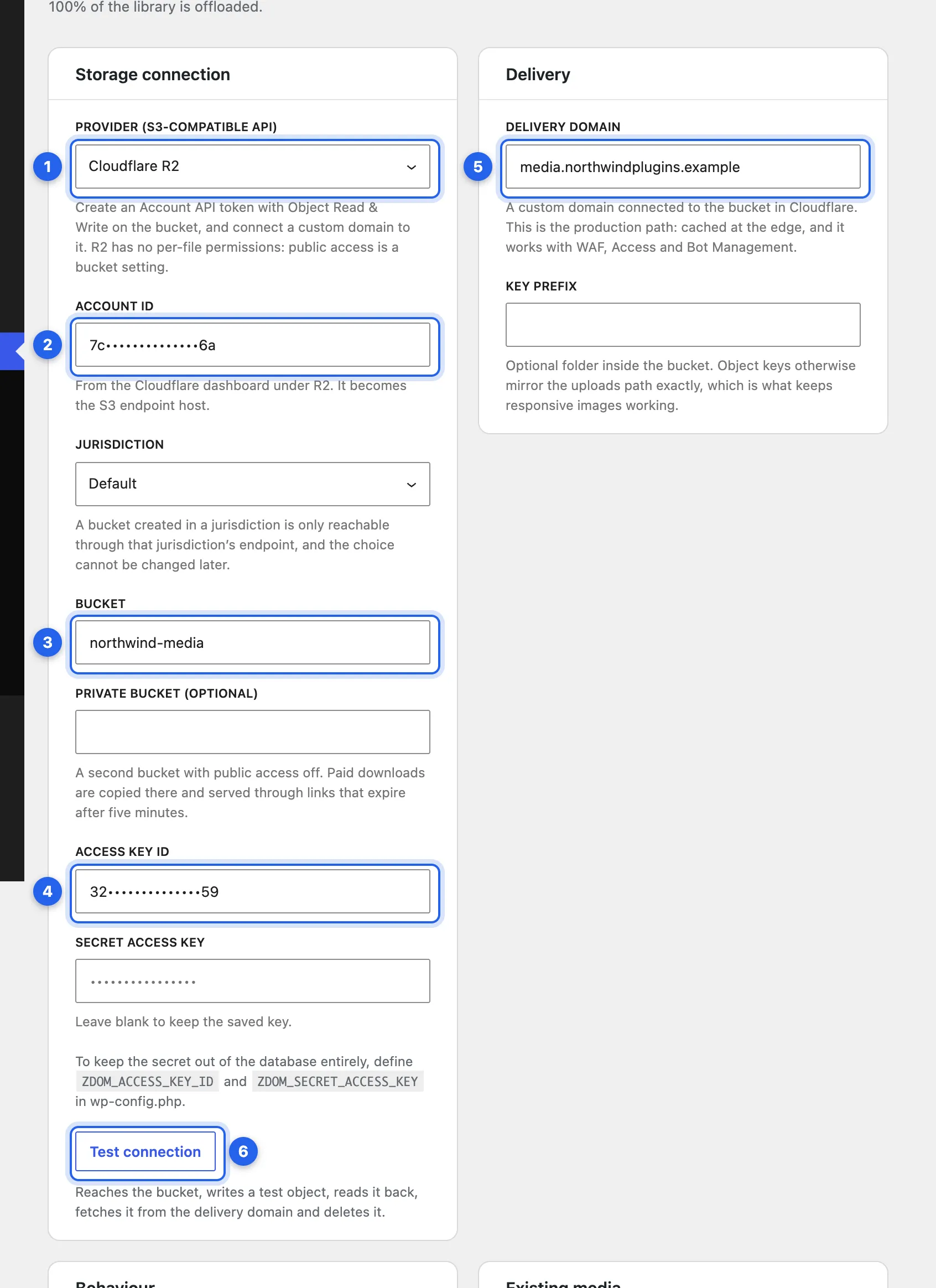
- Test before anything moves. A good offload tool writes a test file, reads it back through your custom domain the way a visitor would, and deletes it, before it touches your library.
- Keep paid downloads out of the public bucket. WooCommerce downloadable files belong in a private bucket, or on your server, behind the purchase check.
- Check staging. A cloned site that shares production’s bucket can delete production’s files unless the plugin stops it.
How we do it
We built Safe Media Offload for exactly this move. It tests the connection step by step before offloading anything, serves from your own domain, keeps WooCommerce downloads private, and won’t let a staging copy delete production’s files. The R2 setup, step by step: Connect Cloudflare R2.
Whichever plugin you use, the numbers above don’t change: R2 is cheap because of the free data out and the cache in front of it. Set up both, and a growing store’s media costs well under a dollar a month.